SOLAR STATION Live
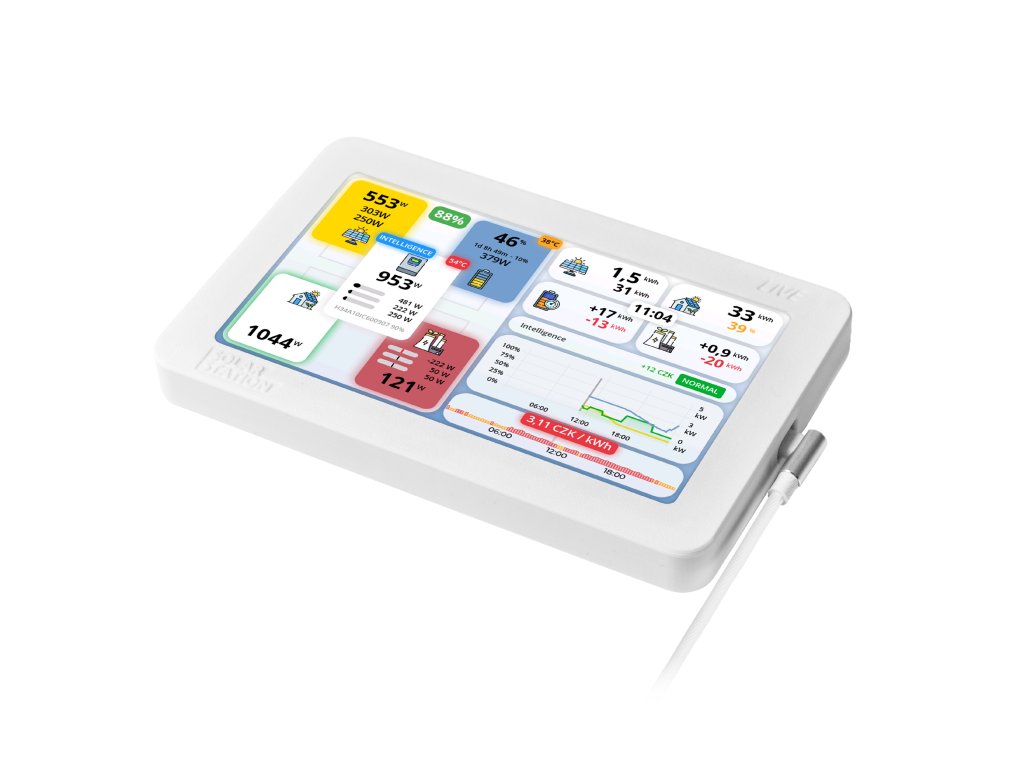
SOLAR STATION Live is a monitoring station for inverters SOLAX X3-HYBRID G3/G4, GoodWe GW10K-ET series, SOFAR SOLAR HYD series, DEYE, Growatt SPH series. The station displays live data from the inverter and must be within its range. It clearly shows energy flow, today's statistics, and a production graph for the last 24 hours on a 7" color display.
| Category: | Fotovoltaika |
|---|---|
| Warranty: | 2 years |
| Weight: | 0.4 kg |



SOLAR STATION Live
A monitoring station that finally shows you what is really going on in your PV system – without a phone app, without cloud accounts and without complicated setup. Just plug it in and within a few seconds you see live production, consumption and battery state.
On a single 7″ display you see where the energy comes from, where it goes and whether you are drawing from the grid unnecessarily. Perfect for anyone who doesn’t want to spend the evening tapping through apps, but still wants confidence they’re getting the most from their solar system.

| SOLAX X3-HYBRID G3/G4, Ultra |
| GoodWe ET series |
| SOFAR SOLAR HYD |
| Victron |
| DEYE |
| GROWATT (SPH/SPA, MIN-XH/MID-XH/MOD-XH, MIN/MIX) |
| Sermatec (SMT-5K/6K/10K-TL) |
| Sungrow (SH hybrids full support, SG grid-tied monitoring) |
| FoxESS (H1/AC1 single-phase, H3/AC3 three-phase) |
The station talks directly to the inverter via its built-in WiFi network. If your device is on the list above, it will usually connect fully automatically once you power it up.
What does it do?
SOLAR STATION Live has one job: to give you instant feedback on whether your PV system is doing what you expect – without your phone, without logging into an app and without digging through charts.
| Energy flow |
A clear flow diagram shows how much power comes from the panels, what the house is using, how the
battery is charging or discharging and whether power is being imported from or exported to the grid.
You can tell at a glance whether you’re running on your own solar production – or on grid power. |
| Today’s stats |
Clean numbers for today: generated, consumed, imported, exported. You see how much your PV has “earned”
you today and how much of your usage came from your own roof.
Perfect for a quick look in the evening – did the sun pay off today? |
| 24h graph |
A 24-hour history of generation, consumption and battery state. You see the morning ramp-up, the midday
peak and the evening run-down from the battery.
Night-time “power hogs” or load spikes that could be shifted are very easy to spot. |
| Spot prices |
A spot electricity price chart for the current day. Expensive and cheap hours are
clearly visible – you instantly see whether it’s a good time to run the dryer, dishwasher or charge your
EV.
Together with your generation curve it makes planning consumption easy, so your electricity bill stays under control. |
| Weather forecast NEW |
Weather forecast for your location right on the display. Below the spot price chart, a strip shows the upcoming forecast in 3-hour steps –
colored icons (day and night), temperature, and sunrise/sunset times. Just enter your town in the settings.
The station also estimates future production from the solar radiation forecast, which improves Smart PV control. |
| Feed-in limiter NEW |
Automatic export limiting based on the spot price. When the price drops below your threshold (e.g. negative midday prices),
the station limits the inverter export to a value you set. You avoid fees for unwanted export and reduce grid stress during the cheapest hours.
The status is shown directly on the Grid tile – green badge = export allowed, orange = currently limited.
Supported on Solax, GoodWe, Deye, Sofar and Sungrow. |
| Smart PV control NEW |
Automatic battery optimization based on spot prices. Every 15 minutes the station decides whether to charge from cheap night-time grid,
sell at peak price, or wait for the sun. It predicts your production and consumption, accounts for battery wear, and shows an estimated saving against
standard self-use operation.
Supported on Solax (X1/X3-Hybrid G4+), GoodWe ET, SOFAR Solar HYD, Deye, FoxESS, Sermatec and Sungrow (SH). The feature is in BETA – feedback welcome. |
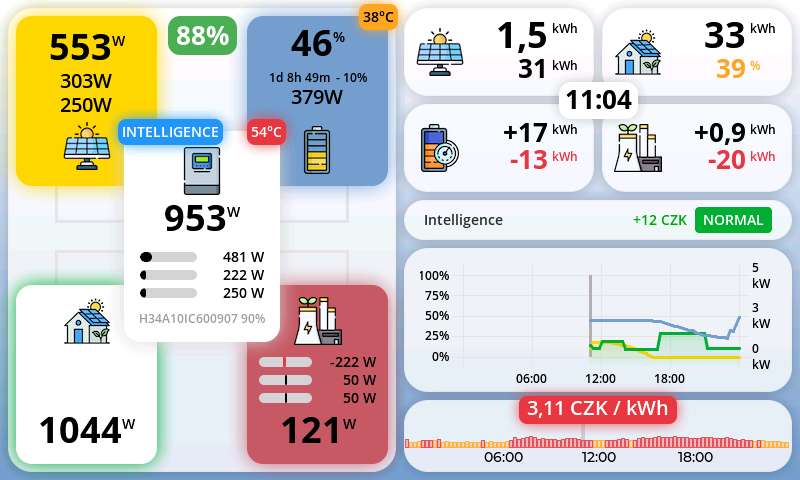
Example screen of SOLAR STATION Live – this is the view you’ll have on your table every day:
Live production, consumption, battery level, inverter temperature and energy flows – everything in real time, without reaching for your phone.
A station that runs your battery by the spot price – on its own
SOLAR STATION Live now does more than show numbers – it switches the working mode of your inverter automatically so the battery does its job at the right moment. No cloud, no subscription, no third-party app. Everything runs on the station itself.
What the smart control does:
- Charges the battery overnight when power is cheap – even during negative spot prices
- Sells energy at peak, when the export price is highest
- Waits for the sun when the forecast says daytime production is enough
- Shows the estimated saving in your currency vs. plain self-use mode
Every 15 minutes the system replays the rest of today and tomorrow, taking production and consumption forecasts, battery wear, and your tariff (spot with K + Q coefficients, fixed price or fully custom) into account – and picks the optimal mode. Always respecting your Min/Max SOC settings.
Currently supported: Solax (X1/X3-Hybrid G4 and newer), GoodWe ET, SOFAR Solar HYD, Deye, FoxESS, Sermatec and Sungrow (SH).
“If you don’t have to configure it, you can’t misconfigure it.”
That’s exactly how SOLAR STATION Live behaves. After power-up it automatically looks for the WiFi network of your inverter – if needed, you enter the password once. From then on the station takes care of the connection itself.
If no suitable network is found, it shows a clear list of available inverter networks – just like in the manual. No MAC addresses, no manual IP setup.
Installation
Commissioning is intentionally kept simple, so anyone can do it – no need for network skills, IP addresses or Modbus knowledge.
- Place the station where you can see it easily (living room, kitchen, hallway, office).
- Plug it into a socket using the supplied USB-C cable and power adapter.
- SOLAR STATION Live automatically searches for your inverter’s WiFi and connects.
If something doesn’t work on the first try, the step-by-step “Troubleshooting” guide walks you through typical cases like “WiFi not found” or “no data shown”.
Before you buy
For SOLAR STATION Live to work correctly, the WiFi signal from your inverter must reach the place where you want to put the station. That’s all – no internet access, router or extra hardware is strictly required.
We currently support typical home installations with one hybrid inverter and one battery. More complex multi-inverter setups are not yet supported – if you’re unsure, just ask us.
Not sure about compatibility or WiFi coverage? Contact us via the form – tell us your inverter model and a short description of the system, and we will get back to you with a recommendation.
| Inverter | WiFi network | Note |
|---|---|---|
| SOLAX | WiFi_XXXXXX (open) | WiFi dongle required. The network must be in its default “open” state. If you can’t see it, check the settings in the SolaxCloud app as described in the manual. |
| GoodWe | Solar-WifiXXXXXX |
Password 12345678. Test the connection briefly with your phone or laptop – if that works,
SOLAR STATION Live will connect as well.
|
| SOFAR SOLAR, DEYE | AP-XXXXXX | The password is printed on the dongle. We recommend testing the connection once in advance – it saves time during first start-up of the station. |
| Victron | venus-XXXXXX | The password is on the device label. In the settings you must enable Modbus TCP (Menu / Settings / Services / Modbus TCP) so the station can read data. |
| Growatt | Your home WiFi | We support SPH/SPA hybrid inverters (single- and three-phase), the newer MIN-XH/MID-XH/MOD-XH (TL-XH) hybrids, and classic non-hybrid MIN/MIX string inverters. The inverter family is detected automatically. The Shine WiFi-X dongle must run firmware version 3.1.1.1 or newer with MODBUS TCP enabled. The manual explains how to check and update the firmware if needed. |
| Sermatec | USR-WIFI232-B2 / Sermatec WiFi | We support hybrid inverters SMT-5K/6K/10K-TL-LV and TH. The station communicates directly via the proprietary OSIM protocol on TCP 8899 – no cloud or Modbus required. The WiFi dongle (USR-WIFI232-B2) broadcasts an AP network starting with "USR-WIFI232". Default IP: 10.10.100.254, AP password: gsstes123456. We recommend switching the dongle to station (STA) mode and connecting to your home WiFi for a more stable connection. |
| Sungrow | Your home WiFi | We support SH-series hybrid inverters (SH-RS single-phase, SH-RT/SH-T three-phase) including intelligent control and the export power limiter; SG grid-tied inverters in monitoring mode. The station communicates via Modbus TCP (port 502) directly with the WiNet-S/WiNet-S2 dongle – no cloud. Modbus TCP must be enabled once in the iSolarCloud app or the dongle web interface, and the dongle's IP address entered in the station. See the manual for details. |
| FoxESS | Your home WiFi | We support H1/AC1-series (single-phase) and H3/AC3-series (three-phase) hybrid inverters including intelligent control. The station communicates via Modbus TCP (port 502) directly with the communication dongle – no cloud. Local Modbus must be enabled once in the FoxESS app (the built-in WiFi-Modbus dongle requires newer firmware), and the dongle's IP address entered in the station. See the manual for details. |
Firmware updates
SOLAR STATION Live does not require regular updates – if it works correctly today, it will keep working like that for years.
When new features arrive (such as spot price charts or support for new inverters), you can update the firmware yourself in just a few minutes.
Simply connect the station to your computer via USB-C, open the update page in your browser and follow the instructions. No special software, no deep IT skills – the process is explained step by step.
SOLAR PLUG
SOLAR PLUG sockets and modules help you use surplus energy for useful loads – water heating, space heating, delayed drying, or charging e-bikes and tools.
Once plugged in, the sockets are automatically detected by SOLAR STATION Live and appear as tiles on the screen, including status and real-time power.
Control follows smart rules: it takes PV output, battery level and house consumption into account. The goal is to use as much of your solar energy on-site as possible instead of exporting it cheaply or draining the battery unnecessarily.
EcoVolter Pro
The portable EcoVolter Pro II wallbox (3×16 A / 11 kW) is the ideal companion for a home PV system – it lets you charge your EV from a three-phase socket while respecting the limits of your grid connection.
SOLAR STATION Live shows the EcoVolter as a tile with a charging cable icon, including whether it’s currently charging, at what power and how much it loads your house.
Charging power can be dynamically controlled based on current PV output and household consumption – so your car is charged mainly from surplus solar and grid import is minimized. A perfect combo if you want to drive on sunshine.
You have full control – tap the tile to open a detailed control panel where you can: start or stop charging with a single touch, set target and maximum current, enable Boost mode for faster charging, and switch between single-phase and three-phase operation. All in real time, right from the screen – no need to touch the wallbox or use another app.
You also see complete statistics: voltage and current on all phases, wallbox temperature, total energy charged and number of charging sessions.
Technical data
| Display | 7″ colour LCD, 800×480 – large enough for clear energy flows and graphs, still compact enough for your living space or kitchen. |
| Processor | ESP32-S3, 240 MHz – modern microcontroller with built-in WiFi and enough performance for smooth graphics at low power consumption. |
| Memory | 4 MB Flash, 512 kB RAM – plenty of room for firmware, new features and long-term stability. |
| WiFi | 2.4 GHz – proven frequency with good wall penetration, ideal for single-family homes. |
| Connector | USB-C – one cable for power and firmware updates. The appropriate cable is included; just plug it into the supplied adapter or any USB socket. |
| Dimensions | 185 × 116 × 18 mm – compact size that easily fits on a shelf, desk or bedside table. |
Box contents
- SOLAR STATION Live – fully assembled and tested, ready to use.
- USB-C cable – for powering the station and for any future firmware updates.
- Desk stand – keeps the display stable at a comfortable viewing angle.
- Self-adhesive wall mount – if you prefer to have the overview on a wall in your hallway, kitchen or utility room.
Colours & manufacturing
We 3D-print the station’s enclosure, so you can choose the colour. As standard we make it in white, black and grey (no surcharge). On request we can make any other colour or a combination of the front and back part — for a non-standard colour please expect a longer delivery time. Just add your request to the order note.

Product rating
Leave a rating
List of ratings
 Aleš
Aleš
 Roman
Roman
 Administrator
(Administrator)
Administrator
(Administrator)
 Jiří Bača
 Grzegorz S
 Michal Janckulík
 Marek S
 Theo Schmaelzle
 Klaus Friedrich
Michal Janckulík
Klaus Friedrich
Michal Janckulík
 Lars Küpper
 Łukasz Gruszka
 Jiří Pupik
Administrator
(Administrator)
Jiří Pupik
Administrator
(Administrator)
 Dirk den Ouden
 Tibor Uherík
 Eduard Záhořík
Eduard Záhořík
Eduard Záhořík
 Stanislav Šachl
 Stanislav Gurka
 Pavel Bem
 Jozef Bartuška
Listing controls
Discussion
List of discussions
Live
Roman Vanžura
 podpora Deye
Jaroslav
podpora Deye
Administrator
podpora Deye
Jaroslav
podpora Deye
Administrator
 AlphaEss
Jindra
AlphaEss
Administrator
AlphaEss
Jindra
AlphaEss
Administrator
 ČEZ Battery Box
Honza
ČEZ Battery Box
Administrator
ČEZ Battery Box
Honza
ČEZ Battery Box
Administrator
 GoodWe GW5K-ET
Čeněk Uher
GoodWe GW5K-ET
Čeněk Uher
 Lukáš
Lukáš
 Podpora Solax X3 NEO 15K LV
Ruslan
Podpora Solax X3 NEO 15K LV
Administrator
Podpora Solax X3 NEO 15K LV
Ruslan
Podpora Solax X3 NEO 15K LV
Administrator
 Podpora Goodwe G2
Peter
Podpora Goodwe G2
Peter
 Rudo
Podpora Goodwe G2
Administrator
Rudo
Podpora Goodwe G2
Administrator
 wallbox priorita dobíjení
Pavel
wallbox
Pavel
wallbox
Administrator
wallbox priorita dobíjení
Pavel
wallbox
Pavel
wallbox
Administrator
 HDO
Roman Miler
HDO
Administrator
HDO
Roman Miler
HDO
Administrator
 Více zařízení
Ondřej Šlechta
Více zařízení
Administrator
Odecet na webu
Roman Miler
Odecet na webu
Administrator
Více zařízení
Ondřej Šlechta
Více zařízení
Administrator
Odecet na webu
Roman Miler
Odecet na webu
Administrator
 Nový manuál a vysvětlení nových funkcí
Vítězslav Krištof
Nový manuál a vysvětlení nových funkcí
Vítězslav Krištof
 Vypnutí displeje
Jan Macháček
Vypnutí displeje
Administrator
Spotřeba
Jan Macháček
Jan Macháček
Spotřeba
Administrator
Vypnutí displeje
Jan Macháček
Vypnutí displeje
Administrator
Spotřeba
Jan Macháček
Jan Macháček
Spotřeba
Administrator
 Goodwe GW10K-ET-20 G2
Jan Novak
Goodwe GW10K-ET-20 G2
Jan Novak
Goodwe GW10K-ET-20 G2
Administrator
Goodwe GW10K-ET-20 G2
Jan Novak
Goodwe GW10K-ET-20 G2
Jan Novak
Goodwe GW10K-ET-20 G2
Administrator
 Nové funkce a barvy.
Milan Zezulka
Nové funkce a barvy.
Administrator
UPDATE
Milan Zezulka
Nové funkce a barvy.
Milan Zezulka
Nové funkce a barvy.
Administrator
UPDATE
Milan Zezulka
 growatt
Administrator
growatt
growatt
Administrator
 SOLAR STATION Live & hybridní měnič ANENJI 4.2KW 24V WIFI
Robert Sedláček
SOLAR STATION Live & hybridní měnič ANENJI 4.2KW 24V WIFI
Robert Sedláček
 DOPLNĚNÍ SSL O BATERII PRO ELIMINACI VÝPADKŮ ZOBRAZENÍ
VRANKA
DOPLNĚNÍ SSL O BATERII PRO ELIMINACI VÝPADKŮ ZOBRAZENÍ
Administrator
DOPLNĚNÍ SSL O BATERII PRO ELIMINACI VÝPADKŮ ZOBRAZENÍ
VRANKA
DOPLNĚNÍ SSL O BATERII PRO ELIMINACI VÝPADKŮ ZOBRAZENÍ
Administrator


